
The Ultimate nopCommerce Product Filter Plugin Guide: Nop Ajax Filters vs Pro
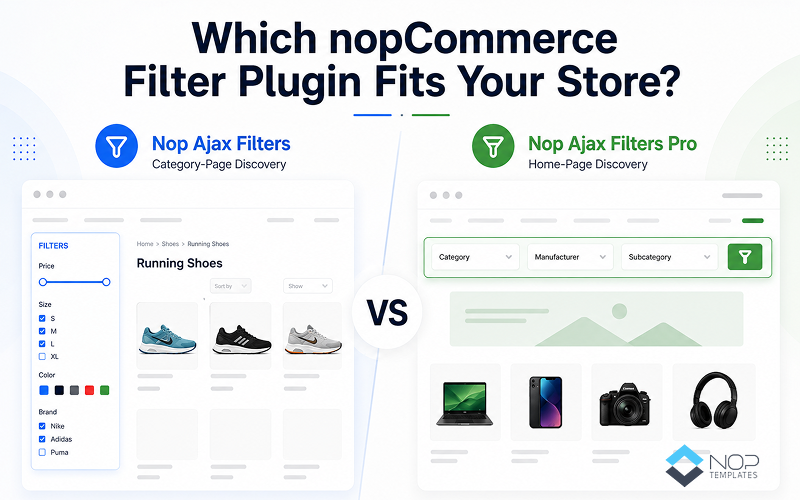
Table of Contents
- The Quick Answer: Which Filter Plugin Should You Choose for Your Store?
- Why Product Filters Quietly Decide Whether a Shopper Buys
- What Both Plugins Get Right Out of the Box
- The Side-by-Side Comparison
- When Nop Ajax Filters Is the Smarter Pick
- When Ajax Filters Pro Actually Earns Its Extra Price
- Which Plugin Fits Your Business Type?
- Is the $50 Jump to Pro Worth It?
- Signs You've Outgrown the Base Plugin
- So, Which One Wins?
- FAQ
Two nopCommerce stores, side by side.
The first is a boutique with 900 handpicked SKUs. Shoppers arrive from Google searches for specific categories "leather sneakers," "matte lipsticks," "cast iron pans." They land on a category page and immediately reach for the filters.
The second is a marketplace with 40,000 SKUs across five brands, three storefronts, and two languages. Its shoppers land on the home page and want to filter by a spec — dosage, storage capacity, voltage, size, before they click anywhere.
Both stores need a product filter plugin. But they don't need the same one.
That's what so many nopCommerce merchants ask us: "What's the difference between Nop Ajax Filters and Ajax Filters Pro, and which should I buy?"
Here's the breakdown.
The Quick Answer: Which Filter Plugin Should You Choose for Your Store?
Choose Nop Ajax Filters ($99) if product discovery in your store starts on category, manufacturer, vendor, or search pages which is the case for most single-store nopCommerce merchants.
Choose Nop Ajax Filters Pro ($149) if discovery starts on your home page, or if you run multi-store or multi-vendor setups where shoppers need to filter before they land on a category.
That's it. The details below will help you decide if the extra $50 is worth it for your store.
Why Product Filters Quietly Decide Whether a Shopper Buys
Filters rarely get the spotlight in ecommerce conversations. Checkout flows do. Product photography does. Filters sit quietly in a sidebar until you realize they're often the difference between a shopper finding what they want and a shopper leaving.
The Baymard Institute's research on ecommerce filtering found that 42% of major ecommerce sites lack important category-specific filters, and poor filter UX is one of the top drivers of category-page abandonment. Nielsen Norman Group has documented the same pattern for two decades: when shoppers can't narrow results quickly, they bounce not to a competitor's better product, but to a competitor's better filter.
Jakob Nielsen put it plainly: "Users spend most of their time on other sites. This means that users prefer your site to work the same way as all the other sites they already know." Your shoppers' patience for a slow filter is somewhere between "none" and "already gone."
Choosing between these two plugins isn't a nice-to-have decision. It's a revenue-lever decision.
What Both Plugins Get Right Out of the Box
Both plugins run on the same core engine fast Ajax filtering by price, manufacturer, vendor, specs, and attributes with checkbox or dropdown UI, color squares, RTL and widget zone support, and full compatibility with nopCommerce 4.70 through 4.90.
They also share the recent performance overhaul: faster filtering on large catalogs, smarter variant handling, and native PostgreSQL support alongside SQL Server and MySQL. If you missed it, we broke down the full update in Faster Filtering, Smarter Variants, and PostgreSQL Support: What's New in Nop Ajax Filters, worth a read before deciding between the two.
The Side-by-Side Plugin Comparison
| Feature | Nop Ajax Filters | Nop Ajax Filters Pro |
|---|---|---|
| Single Domain License | $99 | $149 |
| Multiple Domains License | $188 | $249 |
| Filters on category pages | ✅ | ✅ |
| Filters on manufacturer, vendor, and search pages | ✅ | ✅ |
| Filter by price, specs, attributes, on-sale | ✅ | ✅ |
| Checkbox and dropdown UI modes | ✅ | ✅ |
| Color squares, RTL, widget zones | ✅ | ✅ |
| SQL Server, MySQL, PostgreSQL support | ✅ | ✅ |
| Smarter variant filtering (2026 update) | ✅ | ✅ |
| Home page filter widget | ❌ | ✅ |
| Filter by category, manufacturer, or subcategories on home page | ❌ | ✅ |
| Selectable spec attributes for home page search | ❌ | ✅ |
| Show top-level categories only option | ❌ | ✅ |
| Multi-Store / Multi-Vendor support | ❌ | ✅ |
| nopCommerce 4.70–4.90 compatibility | ✅ | ✅ |
| Free trial + 1 year support | ✅ | ✅ |
Pro is a superset. The real question isn't "which has more features" Pro does. It's "will your store use the extra features enough to justify the extra $50?"
When Nop Ajax Filters Is the Smarter Pick
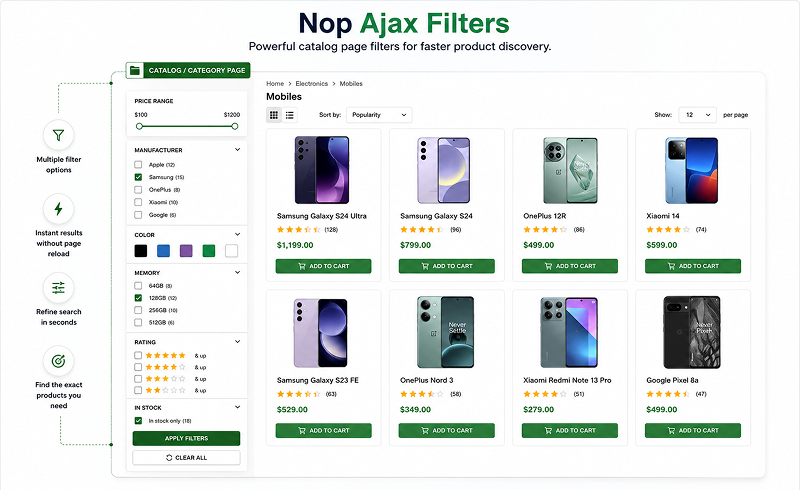
For many nopCommerce merchants, the base plugin is exactly right. Pro would just mean paying for features that sit unused.
Small to Mid-Size Single-Store B2C
If you run one storefront on one database, most of your traffic lands on category pages from Google, and your catalog sits between a few hundred and 10,000 SKUs, the base plugin covers you fully. Shoppers land on a category page, filter by size, colour, or price, and buy. No home-page widget to configure, no multi-store overhead.
Design-Led Boutiques
Fashion, home décor, and curated brand stores build their home pages around hero banners and editorial photography. A filter widget would clash with the design and wouldn't get used anyway since search visitors land on category pages.
At $99, Nop Ajax Filters typically pays for itself in the first month once shoppers stop bouncing off sluggish filters. Try Nop Ajax Filters free before deciding.
When Ajax Filters Pro Actually Earns Its Extra Price
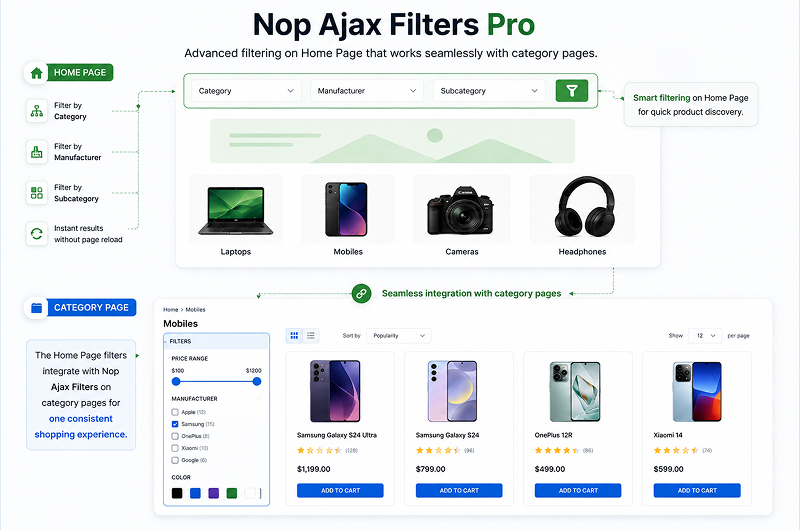
The extra $50 unlocks three capabilities that change how discovery works in specific store types.
When Your Home Page Is the Search Interface
Real estate portals filter by location and price. Marketplaces filter by category and manufacturer. Pharmacy stores filter by concern or dosage. For these stores, sending a shopper to a category page just to start filtering is a wasted click and a wasted click is a lost shopper. Pro adds filter widgets directly to the home page, configurable by category, manufacturer, both, or subcategories.
When You Run More Than One Storefront or Vendor
The base plugin does not support multi-store or multi-vendor. Pro does. If you run multiple storefronts under one admin or operate a multi-vendor marketplace, Pro is the only option.
When Your Buyers Are B2B and Filter by Spec
B2B buyers know what they need before they arrive. A distributor with 60,000 SKUs sells to buyers looking for a hydraulic fitting in 3/4" brass, NPT thread, pressure above 3,000 PSI. They don't browse they filter. Pro exposes those spec attributes right on the home page, turning a five-page journey into a two-page one.
Start a free trial of Ajax Filters Pro and test it on your own catalog.
Which Plugin Fits Your Business Type?
| Business Type | Recommended Plugin | Why |
|---|---|---|
| Single-store B2C boutique (fashion, home, gifts) | Nop Ajax Filters | Discovery starts on category pages from Google. Home-page filters would clash with editorial design. |
| Mid-size B2C store with 2,000–10,000 SKUs | Nop Ajax Filters | Base plugin's performance improvements target this range. Multi-store features aren't needed. |
| Multi-store operator (multiple domains, one admin) | Ajax Filters Pro | Multi-store support is Pro-only. Non-negotiable if you run more than one storefront. |
| Multi-vendor marketplace | Ajax Filters Pro | Multi-vendor filtering only works with Pro. Same non-negotiable rule. |
| B2B distributor with heavy spec catalog | Ajax Filters Pro | Home-page spec filtering shortens buyer journeys where it matters most. |
| Pharmacy or supplements store | Ajax Filters Pro | Shoppers filter by concern, ingredient, or dosage on the landing page. Pro enables that flow. |
| Agency managing multiple client stores | Ajax Filters Pro | One plugin serves every client stack with no fragmentation. |
| Store planning growth into multi-store or B2B | Ajax Filters Pro | Buying Pro now avoids a plugin swap later. Cheaper than migrating twice. |
If your store type is in the top rows, the base plugin is the smart choice. If it's in the lower rows, Pro is the setup that scales with you.
Is the $50 Jump to Pro Worth It?
The single-domain gap is $50. The multi-domain gap is $61. Both include one year of free updates and support.
What does the extra $50 actually buy?
- Home page filter widget → measurable lift in home-page-to-purchase conversion for landing-traffic-heavy stores
- Configurable category, manufacturer, and subcategory filters → fewer clicks to a decision
- Selectable spec attributes on the home page → shortens B2B and spec-heavy buyer journeys
- Multi-store and multi-vendor support → the single most expensive feature to not have if you need it
If your store doesn't need home-page filtering or multi-store support, the extra $50 buys features you'll never use. That's why the honest answer isn't "always buy Pro" it's "buy the one that matches how your store actually works."
Signs You've Outgrown the Base Plugin
If Nop Ajax Filters is serving you well, don't upgrade for the sake of upgrading. But if these signals show up, Pro is the next honest step:
- High home-page bounce rate from shoppers who never make it to a category page
- A second storefront on the roadmap new brand, market, or language site
- A vendor system added, or a marketplace model in progress
- B2B or spec-driven buyers asking "how do I filter by X on the home page?"
- Home page discovery on your A/B test list
Three reasons to stay on the base plugin:
- Traffic is largely organic search that lands on category pages
- No multi-store or multi-vendor plans in the next 12 months
- Home-page redesign isn't on your roadmap this year
If two or more upgrade signals apply, the ROI conversation is short. If none apply, save the $50 you already have the right plugin.
Both plugins offer free trials on your live catalog. If filtering is one of several improvements you're planning, the Ultimate Plugin Collection bundles Pro with 26 other nopTemplates plugins at a fraction of the individual price.
So, Which One Wins?
Nop Ajax Filters wins for the majority of nopCommerce stores single-store merchants, category-page-driven boutiques, mid-size B2C shops that need filters to be fast, accurate, and quiet. At $99, it's one of the highest-ROI plugins in the ecosystem.
Nop Ajax Filters Pro wins for stores where discovery starts on the home page, multi-store or multi-vendor operations, and B2B or spec-heavy buyer journeys that need to be shortened. At $149, it's a rounding error against the conversion lift it unlocks in the right setup.
The question isn't which is better in the abstract. It's which one matches how your store actually works.
FAQ
Which Ajax filter plugin is best for a growing nopCommerce store?
Nop Ajax Filters fits most growing stores that sell through category pages. Ajax Filters Pro fits stores planning multi-store expansion or home-page filtering. Pick based on where product discovery starts.
How do I add Ajax filters to a nopCommerce store?
Install a filter plugin like Nop Ajax Filters from the admin panel, enable it for the pages you want (category, manufacturer, vendor, search), and choose checkbox or dropdown UI. Filters appear on the front end automatically.
Does Ajax filtering improve conversions on nopCommerce category pages?
Yes. Fast Ajax filtering keeps shoppers on the page while they narrow results, which reduces bounce and lifts category to cart movement. Slow or reloading filters have the opposite effect on conversion.
Are Nop Ajax Filters and Ajax Filters Pro mobile-friendly?
Yes. Both plugins render cleanly on mobile through widget zones and support checkbox or dropdown UI modes. That matters because mobile shoppers abandon filters far faster than desktop shoppers when response feels slow.
What is the difference between category-page filtering and home-page filtering in nopCommerce?
Category-page filtering narrows results after a shopper reaches a category. Home-page filtering lets shoppers filter from the landing page and jump straight to matching results. Nop Ajax Filters handles the first; Ajax Filters Pro handles both.