
Faster Filtering, Smarter Variants, and PostgreSQL Support: What's New in Nop Ajax Filters
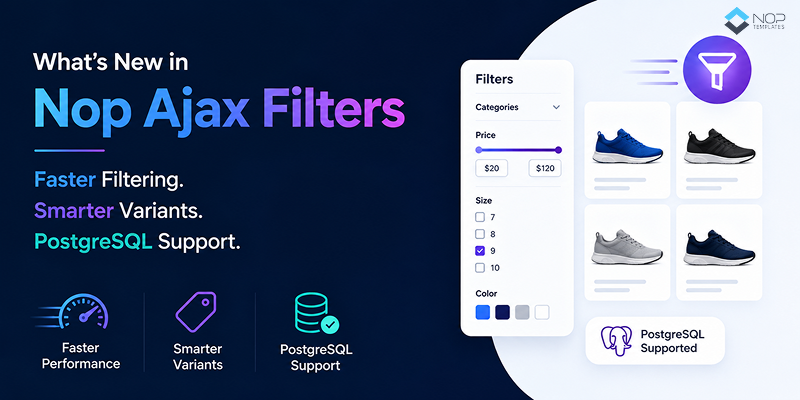
Table of Contents
- Why Product Filtering Is a Silent Revenue Lever for nopCommerce Stores
- A Quick Refresher: What Nop Ajax Filters Does
- What's New, and Why This Update Matters More Than Most
- What This Update Means for Your Store, by Business Type
- Should You Update? Quick Check
- How to Get the Update (and Which Plugin Fits You)
Picture this: a shopper lands on your store looking for something specific. A waterproof running shoe, size 9, under $120, in blue. They know exactly what they want. Their finger hovers over the filter panel.
Every extra second that panel takes to respond costs you, not in dollars directly, but in trust. And eventually, in a tab closed without a sale.
This isn't a small problem. Baymard Institute research shows that 67% of ecommerce sites have poor filtering experiences that push shoppers toward abandonment. Meanwhile, stores that implement advanced product filters have seen conversion rates climb by 26–40%.
If you run a nopCommerce store, you likely already know this, which is why so many merchants rely on Nop Ajax Filters. And the plugin just got its biggest update in years. If you've been waiting for PostgreSQL support, better handling of variants, or faster filtering on a large catalog, this one's for you.
Here's what changed, and why it matters.
Why Product Filtering Is a Silent Revenue Lever for nopCommerce Stores
Filters rarely get the spotlight the way checkout flows or product pages do. But they sit right at the intersection of intent and inventory. When a shopper filters, they're telling you exactly what they want to buy. Your job is to get them there fast.
The bigger your catalog, the more that speed matters. A store with 200 products can get away with a slow filter. A store with 1,000, 20,000, or 100,000 products can't. Slow filters at scale don't just annoy shoppers, they quietly cost you sales you never see, and your analytics never flag.
That's the context for this update. It isn't about adding new UI buttons. It's about making the plugin faster, smarter, and finally usable on any database you want to run.
A Quick Refresher: What Nop Ajax Filters Does
Before we get into the new stuff, a fast recap for anyone new to the plugin.
Nop Ajax Filters adds lightning-fast filtering to your nopCommerce store, no page reloads, no eye-tiring blinking, just instant results as your shoppers click. Out of the box, it lets your customers filter by:
- Price, manufacturer, vendor, product specifications, and product attributes
- On Sale great for stores running promotions
- Filters live on your category, manufacturer, vendor, and search pages automatically
- Two UI modes checkboxes or dropdowns, depending on your theme
- Full color squares, RTL, and widget zone support so it fits any theme cleanly
It's been the go to filtering plugin in the nopCommerce ecosystem for years, powering live stores across fashion, cookware, jewelry, wine, activewear, and heavy-spec B2B catalogs.
Now here's what just changed.
What's New, and Why This Update Matters More Than Most
This isn't a cosmetic release. Five real changes, each solving a problem merchants and developers have been raising for a long time.
PostgreSQL Support Is Finally Here
Nop Ajax Filters (and Ajax Filters Pro) now fully support PostgreSQL.
In practice: no more SQL Server-specific stored procedures under the hood. The plugin's data layer was rebuilt to work natively with PostgreSQL same features, same behavior, no workarounds required.
Why does this matter? nopCommerce itself has supported PostgreSQL since version 4.40, but most premium plugins never caught up. Merchants who wanted to run on PostgreSQL for hosting cost reasons, Linux infrastructure, licensing policies, or open-source preference had to choose between their preferred database and their favorite filter plugin. Not anymore.
If your infrastructure team has been pushing to move off SQL Server, filtering is no longer the blocker.
True Cross-Database Compatibility
Nop Ajax Filters now runs identically across:
- SQL Server
- MySQL
- PostgreSQL
Same features. Same UI. Same filtering behavior. The practical wins are bigger than they sound:
- Migrating databases? Your filters come with you. No rewrites, no re-testing filter logic, no scary weekend deployment.
- Agencies managing multiple client stores on different stacks can finally standardize on one plugin.
- Multi-store setups with mixed databases stay consistent same shopper experience for every store, regardless of what's powering it in the background.
One plugin. Three databases. Zero rewrites.
Optimized for Stores With Thousands of Products
Big catalogs got real attention in this update. The filter processing pipeline was tightened, which means:
- Faster response when a shopper clicks a filter
- Reduced processing time on the server for each filter request
- Smoother experience even when categories hold thousands of SKUs
Here's why merchants should care: filter latency is one of the quietest killers of category-page conversion. Shoppers rarely complain about a 5-second filter delay. They just leave. Shaving off that delay compounds fewer bounces, more clicks, higher category-page conversion rates. Especially if your catalog has grown past the 1,000–5,000 SKU mark and someone on your team has quietly noted things feel "sluggish," this update is aimed at you.
Smarter Handling of Grouped Products and Variants
If you sell products with variants sizes, colors, capacities, dosages, configurations, this one matters.
Grouped products and variant filtering have historically been messy in nopCommerce. Shoppers would filter for "size 9" and see parent products that didn't actually stock a size 9. Or filter by a spec and miss variants that did match. Frustrating for shoppers, embarrassing for merchants.
The update fixes this. Filter results now reflect the variant-level attributes shoppers actually selected. A few examples of where this pays off:
| Store Type | Filter Action | What Shoppers Now See |
|---|---|---|
| Fashion | Filter by size 9 | Only products actually available in size 9 |
| Electronics | Filter by 256GB storage | The right SKU, not the family page |
| Pharmacy / Supplements | Filter by dosage (300mg, 600mg) | The exact variant, not all dosages |
| B2B Distributors | Filter by voltage, material, or spec | Precise SKU-level matches |
Better accuracy means fewer "Why isn't this the right size?" support emails and fewer shoppers giving up because the filter lied to them.
Faster Paging Between Category Pages
Product loading between category pages, page 2, page 3, page 4, and deeper is now noticeably quicker.
This matters because shoppers who browse deep are usually your highest-intent visitors. They're comparing, considering, and closing in on a decision. If pagination feels slow, they lose that momentum. Faster paging keeps them in flow and combined with faster filtering, category pages just feel fast. Feel is what shoppers remember.
What This Update Means for Your Store, by Business Type
Different stores get different value from this release. Here's the honest breakdown.
| Business Type | Key Benefit From This Update |
|---|---|
| B2C stores with large catalogs (fashion, electronics, home, cosmetics) | Faster filters and accurate variant matching mean shoppers find the product they actually wanted, not "close enough." On mobile especially, where patience is thinner, that difference shows up in conversion numbers. |
| B2B distributors and spec-heavy catalogs | Your buyers filter by technical specs at scale. The variant fix and performance boost are directly built for you. Precision matters more than aesthetics in your world, and this update leans into that. |
| Multi-store and multi-vendor operators | Cross-database compatibility unlocks setups that used to require ugly workarounds. Run different stores on different stacks filters stay identical everywhere. |
| Merchants planning a database migration | If SQL Server licensing has been sitting on the cost-reduction list, PostgreSQL support just removed the biggest filter-related blocker. You can migrate without losing filtering functionality. |
| Agencies and nopCommerce solution partners | One plugin now serves every client stack: SQL Server, MySQL, and PostgreSQL clients you had to say no to before. Less internal fragmentation, easier onboarding. |
Should You Update? Quick Check
If any of these describe your store, this update is for you:
- You run 3,000+ SKUs, and filter response times have been on your radar
- Your infrastructure team wants to move off SQL Server to PostgreSQL
- You sell grouped products or variants, and filter accuracy has been inconsistent
- You manage multiple stores on different databases and want plugin consistency
- Your customers browse deep into category pagination, and every second counts
If two or more of these apply, you're leaving performance and revenue on the table by not updating. Here's how to get started.
How to Get the Update (and Which Plugin Fits You)
Both plugins in the Ajax Filters family got this update, and both offer free trials so you can see the changes running on your own catalog.
Nop Ajax Filters is the core plugin: filtering on category, manufacturer, vendor, and search pages. It's the right fit if product discovery in your store starts on category pages.
Nop Ajax Filters Pro goes further: everything the base plugin does, plus home page filter widgets (so shoppers can start filtering the moment they land), category and subcategory search zones, and full multi-store and multi-vendor support. It's the right fit for larger catalog operations or stores where landing-page discovery drives sales.
Both work with nopCommerce 4.70 through 4.90.
Not sure which one fits your setup? We'll be publishing a dedicated Nop Ajax Filters vs. Ajax Filters Pro comparison soon but for now, the free trials are the fastest way to decide.