
Mobile-First eCommerce Design: How to Convert 75% Mobile Traffic
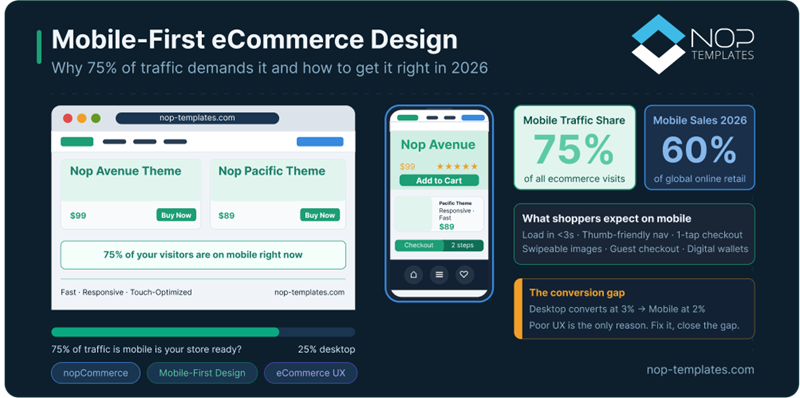
Table of Contents
- The Numbers Don't Lie: Mobile Is the Default Shopping Device
- Why Mobile Conversion Still Lags (And Why It Matters)
- Responsive vs Mobile-First Design
- 8 Mobile-First UX Principles That Drive eCommerce Conversions
- The nopCommerce Advantage: Built for Mobile Behavior
- Is Your Store Actually Mobile-First? (Quick Audit)
- The Business Case: What Fixing Mobile UX Delivers
- Final Thought: Mobile-First Is the Baseline
- Frequently Asked Questions About Mobile-First eCommerce
Picture this: a shopper is on their lunch break, browsing your store on their phone.
They find the perfect product. Tap "Add to Cart."
Then friction hits.
Tiny text. Misaligned fields. A checkout button buried below a wall of content.
They leave.
Not because they didn't want the product, but because your mobile experience made it too hard to buy.
This isn't a rare edge case. It's happening at scale.
Today, over 75% of eCommerce traffic comes from mobile devices, especially in high-intent markets like the US, UK, and Europe.
Yet most online stores are still optimized for desktop behavior.
The result? You're paying to acquire mobile traffic… that your store isn't built to convert.
The Numbers Don't Lie: Mobile Is the Default Shopping Device
Smartphones now generate 75–78% of global eCommerce traffic.
This isn't a trend anymore, it's the default behavior.
But here's the disconnect:
While traffic is overwhelmingly mobile, conversion rates still lag behind desktop (≈2% vs 3%).
That 1% gap doesn't sound like much until you realize it represents billions in lost revenue, caused not by lack of intent, but by poor mobile experience.
Additional data reinforces the shift:
- Mobile commerce is expected to account for nearly 60% of global online retail sales in 2026
- Around 1.65 billion people will shop via smartphone
- Peak events like Black Friday now see ~70% of sales coming from mobile
- In the US, over 70% of consumers prefer shopping on smartphones
Why Mobile Conversion Still Lags (And Why It Matters)
If mobile drives the majority of traffic, why does it still underperform in conversions?
The short answer: experience friction, not intent.
Mobile users are often:
- Navigating with one hand
- On slower or unstable connections
- Multi-tasking or time-constrained
When your store isn't designed for these conditions, even small usability issues compound into lost revenue.
Closing this gap is one of the highest ROI opportunities in modern eCommerce.
"Responsive" Is Not the Same as "Mobile-First"
A responsive design adapts your desktop experience to smaller screens. A mobile-first design prioritizes the mobile experience from the start.
That difference sounds subtle, but in practice, it changes everything:
- What loads first (or doesn't load at all)
- Where key actions are placed (thumb vs stretch zones)
- How quickly users can move from product → checkout
Responsive design makes your store fit mobile. Mobile-first design makes your store work on mobile.
8 Mobile-First UX Principles That Directly Impact eCommerce Conversions
1. Speed That Feels Instant
Mobile speed isn't just a technical metric; it's a direct revenue driver. Even a 0.1-second improvement in load time can increase conversions by over 8%.
Meanwhile, more than half of users abandon sites that take longer than 3 seconds.
Every unnecessary script, oversized image, or animation delay increases friction, and on mobile, friction kills conversions fast.
2. Thumb-Zone Navigation
Most users browse with one hand. If your key actions sit at the top corners of the screen, they're literally harder to reach.
Mobile-first design places:
- Add to Cart
- Navigation
- Checkout
Within natural thumb reach, reducing friction without changing your offer.
3. Touch-Friendly Tap Targets
A fingertip isn't a mouse. Buttons smaller than 48×48 pixels lead to mis-taps, frustration, and drop-offs.
This is one of the most overlooked conversion killers in mobile UX.
4. Mobile-Optimized Product Pages
On mobile, hierarchy is everything. Your product page should prioritize:
- Large, swipeable product images
- Price and key options immediately visible
- Add to Cart above the fold
- Secondary details in collapsible sections
If users have to hunt for the buy button, you've already lost momentum.
5. Simplified, Frictionless Checkout
Mobile checkout isn't where you collect data; it's where you remove resistance.
High-performing checkouts prioritize:
- Guest checkout by default
- Digital wallets (Apple Pay, Google Pay)
- Single-column layout
- Smart input fields (autofill, correct keyboards)
- Minimal required fields
The goal isn't completeness, it's speed and completion.
6. Fast, Visible Search
Mobile users search more than they browse.
Your search bar should be :
- Immediately visible
- fast
- Autocomplete-enabled
Every extra tap between intent and result increases drop-off.
7. Optimized Images Without Performance Loss
Images drive decisions, but can also kill speed.
Mobile-first design ensures:
- Correct image sizing per device
- Lazy loading
- High clarity without performance trade-offs
8. Consistent Cross-Device Experience
Modern buyers switch devices constantly:
Mobile → Desktop → Mobile.
Your store must :
- Sync carts
- Retain sessions
- Maintain consistent UX
This continuity directly impacts conversions and retention.
The nopCommerce Advantage: Built for Mobile Behavior
Most nopCommerce stores aren't failing because they lack responsiveness; they're failing because the experience wasn't designed for how people actually shop on mobile.
That's the gap mobile-first themes solve.
Instead of adapting desktop layouts, they prioritize:
- Real-world mobile speed performance
- One-handed usability
- Faster product-to-checkout flow
The result isn't just a better-looking store, it's a store that converts mobile traffic more efficiently, especially in competitive markets like the US and Europe.
Themes like Avenue, Emporium, and Pacific are specifically built around these principles.
Is Your Store Actually Mobile-First? (Quick Audit)
Before investing in redesign, run this quick audit.
If you fail more than 3 of these, you're actively losing revenue.
Performance
- Does your store load in under 3 seconds on mobile data?
- Are images optimized for mobile devices?
- Does your mobile PageSpeed score exceed 80?
UX & Navigation
- Is search visible without opening menus?
- Can users add to cart without scrolling?
- Are tap targets properly sized?
Checkout
- Is guest checkout enabled?
- Is your checkout single-column?
- Do you support Apple Pay / Google Pay / Amazon Pay?
The Business Case: What Fixing Mobile UX Delivers
Improving mobile UX isn't cosmetic; it's financial.
| Improvement | Impact |
|---|---|
| Faster load times | Can increase conversions by 8%+ |
| Removing checkout friction | Significantly reduces cart abandonment |
| Digital wallets | Dramatically improves completion rates |
| Optimized mobile UX | Closes the mobile vs desktop conversion gap |
If you're investing in traffic but ignoring mobile UX, you're leaking revenue at scale.
Final Thought: Mobile-First Is the Baseline
Mobile-first isn't a competitive advantage anymore, it's the baseline.
The real question is:
Is your store converting the mobile traffic you already have?
Because if it's not, you don't have a traffic problem. You have an experience problem.
A purpose-built mobile-first nopCommerce theme can help you recover that lost revenue, without rebuilding your store from scratch.
Looking for a nopCommerce theme engineered for mobile-first performance? Browse our full collection of responsive nopCommerce themes — each one built to convert mobile shoppers, not just display correctly on their screens.
Frequently Asked Questions About Mobile-First eCommerce
What is mobile-first eCommerce design?
Mobile-first design means building your store for mobile devices first, then scaling up for larger screens.
Why is mobile-first design important?
Because most traffic comes from mobile, and poor mobile UX directly reduces conversions.
What is the difference between responsive and mobile-first design?
Responsive design adapts desktop layouts to smaller screens. Mobile-first design starts with mobile behavior and scales up.
How can I improve mobile conversion rates?
Focus on speed, simplified checkout, thumb-friendly navigation, and digital wallets.
Does mobile-first design impact SEO?
Yes. Google uses mobile-first indexing, so your mobile experience directly affects your search rankings.



