
11 Best nopCommerce Plugins That Make Shoppers Love Your eCommerce Store In 2026
Introduction: Why the Right Ecommerce Plugins Decide How Your Store Performs
Choosing the right plugins for your nopCommerce store is not a small technical decision, it directly shapes how customers experience your store. You don't need dozens of plugins to succeed. You need the right ones, placed at the right moments in the shopping journey.
In 2026, shoppers don't explore stores patiently. They expect search to work instantly, carts to behave smoothly, and checkout to feel effortless.
Every plugin you add from the first interaction to the final purchase, either helps shoppers move forward or quietly slows them down. There is no neutral choice.
Most of the work that decides whether a customer buys or leaves happens behind the scenes. Plugins control discovery, navigation, cart flow, checkout, and follow-ups often without being visible. When these systems are chosen wisely, the store feels natural to use. When they aren't, problems show up as slow pages, broken flows, and confused customers, issues many store owners experience more often than they admit.
This guide is not about installing more plugins or chasing features. It focuses on how the right plugin choices improve the shopper journey end to end, help customers feel confident while buying, and make store management simpler not heavier.
What Are Ecommerce Plugins and How They Actually Work
Ecommerce plugins are often explained as "add-ons" or "extra features," but that description misses what they really do. In practice, plugins act as behavior controllers for your store. They decide how shoppers search, browse, interact with the cart, complete checkout, and even how they are re-engaged after leaving.
At a technical level, plugins extend what your ecommerce platform can do. At a business level, they define how your store behaves under real shopper conditions, such as traffic spikes, mobile usage, large catalogs, impatient buyers, and repeat customers.
In a nopCommerce store, plugins sit between the core platform and the real-world shopping experience. They intercept actions like search queries, add-to-cart clicks, checkout steps, and follow-ups, then modify how those actions respond. That's why two stores on the same nopCommerce version can feel completely different to shop from.
How plugins influence the shopper journey
Every stage of the journey is touched by plugins, whether store owners realize it or not:
- When a shopper searches for a product, plugins control how accurate and forgiving those results are
- While browsing, plugins determine how fast filters respond and whether pages reload unnecessarily
- At checkout, plugins decide how many steps exist, how smooth the flow feels, and where shoppers hesitate
- After exit, plugins manage whether customers are reminded, ignored, or re-engaged
None of this is visible on the surface but shoppers feel it immediately.
Why "more plugins" is rarely the right answer
One of the most common misconceptions is that adding plugins automatically improves a store. In reality, each plugin introduces:
- Additional logic
- Extra requests
- New dependencies
When plugins overlap in purpose or are added without a journey strategy, stores become slower, harder to maintain, and more fragile during upgrades. That's why high-performing stores often run fewer plugins than average, with each one carefully chosen to solve a specific friction point.
In 2026, shoppers don't reward stores for having more features. They reward stores that:
- Reduce effort
- Remove steps
- Respond instantly
- Feel predictable and trustworthy
Plugins that support these outcomes quietly improve conversion and retention. Plugins that don't often become invisible liabilities.
Why plugin decisions matter more in 2026
Shopper expectations have changed. Patience is lower, mobile usage is higher, and tolerance for friction is minimal. Small delays or confusing flows that were acceptable a few years ago now cause exits.
This is why plugin choices are no longer a technical afterthought. They are experience decisions. Each plugin either supports the way modern shoppers behave or works against it.
Best nopCommerce Plugins in 2026: What Matters and Why
Smart Search & Product Discovery
Use case and why it matters
Search is the highest-intent entry point for online shoppers. Customers who use search usually know what they want, making them far more likely to convert than casual browsers.
Studies show that 44% of ecommerce revenue comes from just 24% of shoppers who use the search bar, making search performance a direct revenue driver rather than a simple usability feature.
When shoppers type into the search box, expectations are simple. They want relevant results even if they misspell a word or use different terms. Search that understands intent and tolerates errors consistently performs better than basic keyword matching.
For many stores, improving search relevance delivers one of the highest conversion gains with relatively low effort.
What to check in a search plugin
A search plugin should do more than return results. It should guide shoppers toward products they are most likely to buy.
Effective solutions support fuzzy matching, synonym handling, attribute-based ranking, and faceted navigation. They allow store owners to influence results using availability, popularity, and stock signals. Advanced setups require catalog indexing and correct attribute mapping.
The goal is helping shoppers find the right product faster with less friction.
Benefits
- High return on investment when relevance is tuned
- Lower bounce rates and higher conversion
- Helps shoppers find products quickly and confidently
Practical guidance for store owners
Search should not be treated as plug-and-play. Choosing a trusted nopCommerce vendor matters for setup support and long-term reliability.
Perpetual licenses are often preferred, as paying once for core search functionality tends to be more stable over time.
One-Page Checkout Optimization
Use case and why it matters
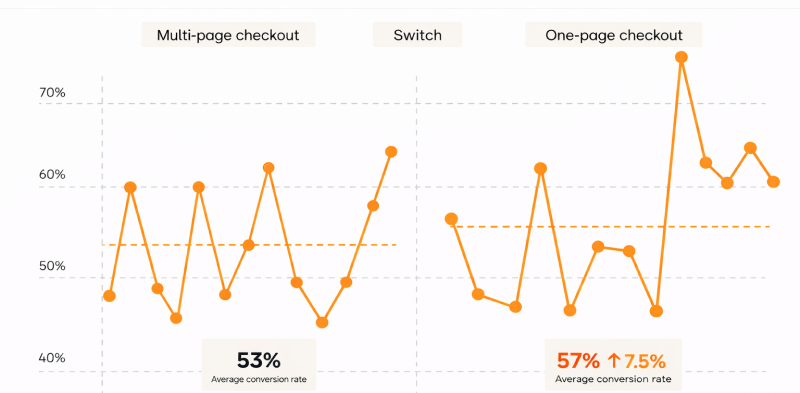
Checkout is the most fragile step in the ecommerce funnel. This is where even small issues can lead to lost sales. Studies indicate that one-page checkout flows can improve conversions by around 7.5%, mainly by reducing friction at the final decision stage.
Extra clicks, slow validation, page reloads, or confusing steps create hesitation. A streamlined, single-page checkout reduces decision points and helps shoppers stay focused on completing their purchase. This is especially important for mobile users, where speed and simplicity directly influence buying behavior.
What to check in a one-page checkout plugin
A one-page checkout plugin brings shipping, billing, payment, and order confirmation into a single flow. Instead of navigating multiple pages, shoppers complete the process in one place.
Effective setups use client-side validation and inline shipping or tax calculations to avoid full page reloads. The plugin must integrate smoothly with payment gateways and shipping services while handling conditional logic such as promo codes, address validation, and optional fields. Reliability matters more than visual complexity, especially when real payments are involved.
Benefits
- Immediate and measurable improvement in checkout completion
- Faster and smoother experience for mobile shoppers
- Reduced cart abandonment and more completed orders
Practical guidance for store owners
Checkout is not an area to treat casually. Choosing a reliable nopCommerce plugin provider is important for security, performance, and long-term compatibility.
The plugin should support multi-store setups and receive regular updates. Strong post-installation support helps resolve gateway issues, edge cases, and performance concerns before they impact live customers.
Abandonment Recovery & Customer Reminders
Use case and why it matters
A significant portion of cart abandonment is recoverable. Shoppers often get distracted, compare prices, or pause their purchase temporarily rather than abandoning it completely. When handled correctly, timely and contextual follow-ups can bring many of these customers back.
Abandoned cart reminders, unpaid order prompts, and post-purchase follow-ups help recover revenue that would otherwise be lost. When messages feel relevant and well-timed, they also strengthen trust and encourage repeat purchases. Automated reminder flows are typically low cost and deliver strong returns when implemented thoughtfully.
Data shows that sending three to five reminder messages often produces the best results, with open rates commonly reaching 40--50% when content and timing are aligned with shopper intent.
How customer reminder plugins work
Customer reminder plugins monitor key actions such as cart creation, partial checkout, and unpaid orders. Based on these events, they trigger sequenced messages through email or SMS using predefined rules.
Effective tools allow store owners to control timing with delay windows, apply conditions to avoid over-messaging, and personalize content using customer or cart data. Testing subject lines and delivery timing helps improve performance over time. Multi-channel messaging and proper unsubscribe handling are essential to stay compliant and avoid customer fatigue.
Benefits
- Direct recovery of revenue that would otherwise be lost
- Improves retention through well-timed lifecycle communication
- Automated follow-ups require minimal ongoing effort
Practical guidance for store owners
Abandonment recovery works best when intent and context are respected. Avoid generic reminders, test messaging carefully, and adjust flows based on real customer behavior rather than assumptions.
Ajax Filters & Instant Product Filtering
Use case and why it matters
Instant AJAX-based filtering can reduce page abandonment by 20--40%, keeping shoppers engaged longer on category and shop pages. Category pages are key discovery points, especially for stores with large or growing catalogs.
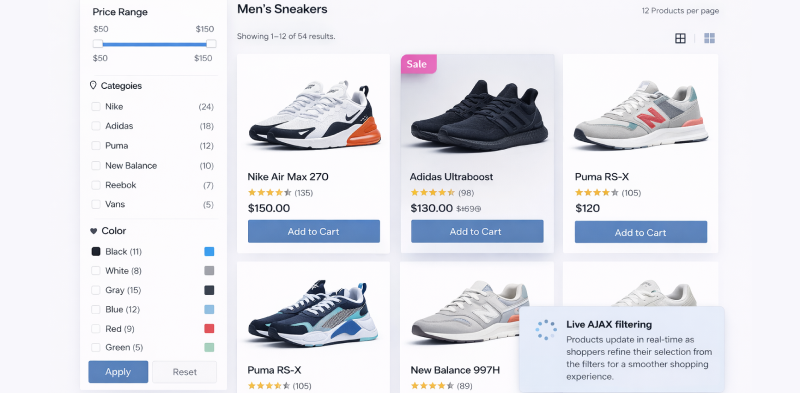
When filters trigger full page reloads, shoppers lose context and patience. Each reload interrupts browsing flow and adds friction. Instant filtering updates product results in real time, allowing shoppers to refine selections without losing their place. This keeps navigation fast, predictable, and easier to use.
By reducing perceived latency, AJAX filters encourage deeper exploration. Shoppers interact with more products, spend more time browsing, and are more likely to add items to the cart. This directly improves engagement and conversion on category pages and search-driven landing pages.
How AJAX filter plugins work
AJAX filter plugins update product listings using client-side requests, without refreshing the entire page. Only the product grid changes based on selected filters.
Well-implemented solutions combine this with caching and precomputed counts to stay fast at scale. SEO-safe setups preserve crawlable URLs and allow search engines to index filtered pages correctly. These plugins typically work with attributes, price ranges, vendors, and product specifications.
Benefits
- Lower bounce rates and better engagement
- More add-to-cart actions from smoother browsing
- Performs well for mid-sized and large product catalogs
Practical guidance for store owners
AJAX filtering should be implemented carefully. Validate SEO behavior, test caching interactions, and ensure filtering works consistently across devices to avoid hidden performance or indexing problems.
Ajax Cart & Quick View Experience
Use case and why it matters
When shoppers can preview product details without leaving the category page and add items to the cart without full page reloads, the browsing flow stays uninterrupted. These small UX improvements compound over time. Shoppers explore more products, add items more confidently, and stay engaged longer.
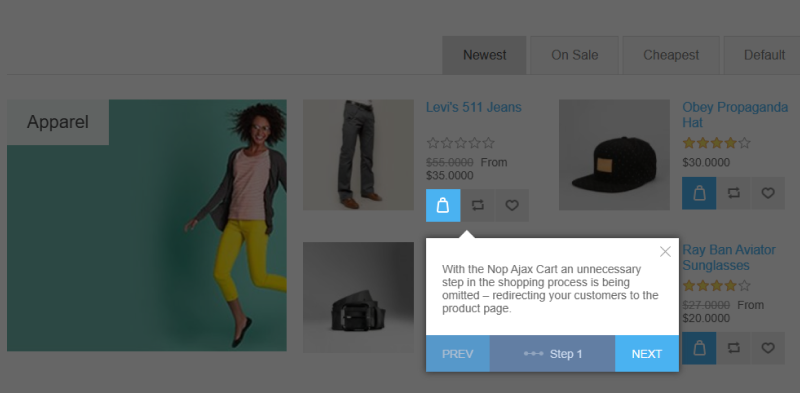
For stores with medium to large catalogs, Ajax Cart and Quick View act as simple but effective conversion levers. They reduce unnecessary navigation, keep context intact, and remove friction during discovery. This is especially valuable on mobile, where page reloads and back-and-forth navigation quickly lead to abandonment.
By keeping shoppers in control and minimizing interruptions, these tools help increase add-to-cart rates and overall session value.
How Ajax Cart works in practice
Quick View displays key product details in a modal or inline panel, allowing shoppers to evaluate items without leaving the listing page. Ajax Cart updates cart contents asynchronously and often shows a mini-cart summary, confirmations, or product suggestions after items are added.
Effective implementations support variant selection, product attributes, and cross-sell logic directly within the Quick View or cart interaction. Accessibility is critical. Modals must manage focus correctly and behave predictably across devices. Poor handling can frustrate users and break the experience, particularly on mobile.
Analytics integration also matters. Add-to-cart actions, Quick View opens, and variant selections should be tracked accurately to ensure performance data reflects real user behavior.
Benefits
- Immediate UX improvement leading to higher add-to-cart rates
- Pairs well with cross-sell and upsell strategies
- Longer browsing sessions and higher engagement
Practical guidance for store owners
Design mobile-friendly, accessible pop-ups with proper focus control, and ensure event-based analytics capture Quick View and Ajax Cart interactions correctly.
Smart Product Collections & Merchandising
Use case and why it matters
As product catalogs grow, shoppers need guidance. Too many choices without structure increase decision fatigue and often lead to drop-offs. Smart product collections create curated paths that help shoppers discover relevant products faster.
Collections such as new arrivals, trending products, on-sale items, or curated bundles guide shoppers based on intent rather than forcing them to browse endlessly. This not only improves the shopping experience but also allows merchants to highlight strategic products without relying on constant manual updates.
Studies show that average order value can increase by 23--35% when bundles or curated collections appear on product pages and homepages. Dynamic collections driven by rules reduce merchandising overhead while keeping product displays fresh, relevant, and aligned with business goals.
How smart product collection plugins work
Merchandising plugins allow store owners to create collections either manually or through rule-based logic. These rules may be built around product attributes such as category, tags, stock levels, sales performance, or manually pinned items.
To maintain performance, most implementations load collection data asynchronously so pages remain fast. Integration commonly includes home page sections, category highlights, landing pages, and promotional zones, ensuring collections appear at the right moments in the shopper journey.
When configured correctly, collections update automatically as inventory, pricing, or sales signals change, removing the need for constant hands-on management.
Benefits
- Strong control over seasonal and promotional merchandising
- Helps rotate inventory and surface high-margin products
- Increases average order value through bundles and cross-sells
Practical guidance for store owners
Use smart collections intentionally. Limit the number shown at once, review rules regularly, and focus on guiding shoppers rather than overwhelming them with choices.
Sales Campaigns & Product Highlights
Use case and why it matters
Clear and honest promotions help shoppers make faster decisions. When offers are visible at the right time, they create urgency without forcing the experience. Visual signals such as product ribbons, countdown timers, and daily deal highlights communicate value instantly and reduce hesitation.
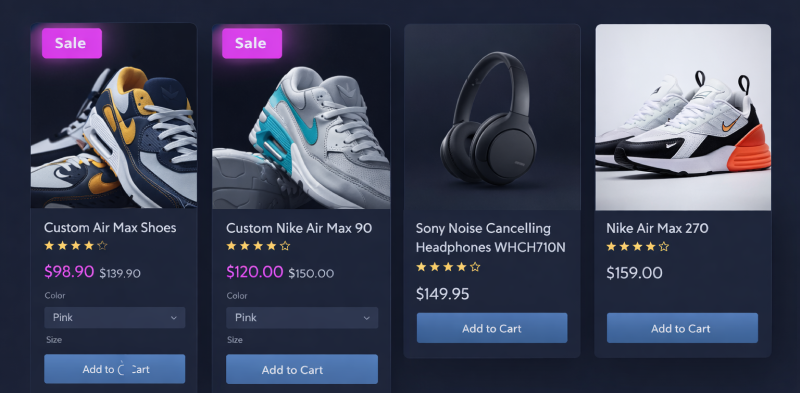
Used sparingly, these elements accelerate decision-making and support inventory movement during seasonal sales, campaigns, or product launches. The goal is to guide attention, not overwhelm shoppers. When promotional signals feel intentional, they build trust rather than pressure.
Campaign tools are most effective when promotions remain visible across browsing, not just on landing pages. Integration with navigation elements like mega menus and filters ensures offers stay relevant throughout the shopping journey.
How sales campaign plugins work in practice
Sales campaign plugins allow merchants to schedule price changes, define campaign windows, and control where promotions appear. This includes displaying ribbons, badges, or timers on product listings and product detail pages.
Strong implementations keep pricing, availability, and promotional messaging synchronized to avoid confusion at checkout. Accurate timing is especially important when caching layers are involved, ensuring campaigns start and end as expected.
Benefits
- Effective for planned promotions and launches
- Faster inventory sell-through during campaigns
- Higher engagement with promotional placements
Practical guidance for store owners
Use campaigns intentionally. Limit frequency, test pricing behavior before launch, and keep promotional signals consistent and trustworthy.
Store Locator & Local Pickup
Use case and why it matters
For omnichannel retailers and merchants with a physical presence, a store locator plays a direct role in conversion. Shoppers often hesitate when delivery times feel slow or availability is unclear. Showing nearby stores with pickup options removes that uncertainty and helps customers decide faster.
Local pickup is especially valuable for last-minute or convenience-driven buyers. When shoppers can see where a product is available and how close it is, they are more likely to complete the purchase instead of abandoning it or contacting support for clarification. A clear store locator also reduces common pre-purchase questions around location, hours, and fulfillment options.
How store locator plugins work in practice
Store locator plugins integrate with mapping services such as Google Maps to display store locations, directions, and operating hours. More advanced setups connect location data with inventory systems to show availability per store.
At checkout, these plugins can support in-store pickup by allowing shoppers to select a location based on real availability. Admin interfaces typically allow merchants to manage pickup points, business hours, and store visibility without manual updates on the storefront.
Benefits
- Builds local trust and supports in-store sales
- Reduces customer uncertainty about availability and pickup options
- Improves omnichannel conversion rates
Practical guidance for store owners
Keep store data accurate and updated. Reliable availability and clear pickup information are what make store locator features effective, not just the map itself.
Enterprise Integrations (ERP, Payments & Reporting)
Use case and why it matters
At scale, an ecommerce store succeeds or fails based on how well its systems integrate. Stable payment processing, accurate inventory synchronization, and reliable reporting are not optional once operations grow. These integrations keep daily operations running smoothly and prevent issues that directly impact revenue and customer trust.
Enterprise integrations are foundational rather than decorative. They ensure orders flow correctly, stock levels stay accurate across systems, and financial data is consistent. Without them, teams rely on manual checks and workarounds that introduce delays, errors, and operational risk, especially during high-traffic periods.
How it works in practice
Enterprise integration plugins connect nopCommerce with ERP, CRM, payment gateways, and analytics platforms through APIs or structured file transfers. Well-designed connectors handle data mapping, retries, and error recovery to prevent duplicate orders or missing updates.
Security and compatibility are critical. Payment integrations must meet compliance standards, and ERP connections need to remain compatible across platform upgrades. Strong connectors are designed to handle version changes without breaking core business workflows.
Benefits
- Essential for businesses with complex or high-volume operations
- Faster order processing and fewer inventory discrepancies
- Reduced operational risk and less manual reconciliation
Practical guidance for store owners
Treat enterprise integrations as long-term infrastructure. Choose solutions with strong documentation, support, and upgrade paths to avoid disruption as your store scales.
EMI Options & Flexible Payments
Use case and why it matters
High-ticket products often fail to convert because of upfront cost, not lack of interest. Many shoppers want the product but hesitate at the payment stage. EMI options reduce this friction by spreading the cost into predictable monthly installments, making expensive purchases feel manageable and less risky.
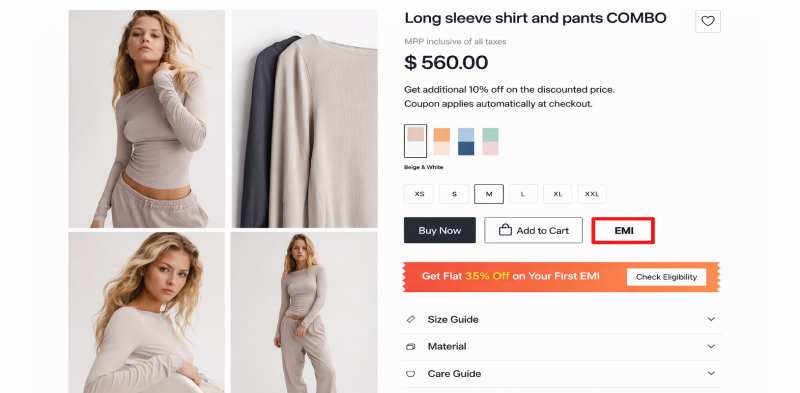
Displaying EMI details directly on the product page helps shoppers evaluate affordability early. When customers can see tenure options, interest rates, monthly payments, and total cost before checkout, it reduces surprises and builds confidence. This is especially effective for electronics, appliances, B2B products, and premium categories where budget planning matters.
How EMI options work in practice
EMI plugins display installment details in a pop-up on the product detail page. Store owners can configure supported banks, interest rates, tenure durations, and total payable amounts. General terms and conditions can be shown alongside the EMI table to set clear expectations.
This information is presented before checkout, allowing shoppers to compare payment options without leaving the page. The plugin typically integrates with payment gateways that support EMI flows while keeping calculations transparent and consistent.
Benefits
- Increases conversion for high-value products
- Reduces checkout hesitation by showing affordability early
- Improves trust through transparent payment breakdowns
Practical guidance for store owners
Use EMI options selectively for relevant products. Keep calculations accurate, terms clear, and supported banks up to date to avoid confusion at checkout.
Price Match & Competitive Assurance
Use case and why it matters
Online shoppers compare prices constantly. Even when they trust a store, finding a lower price elsewhere can stop a purchase instantly. A price match option reassures customers that they don't need to leave the store to get the best deal.
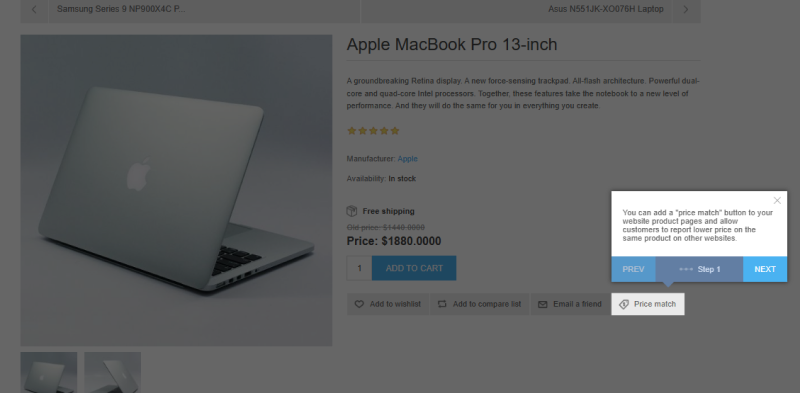
Allowing shoppers to report a lower price keeps them engaged instead of losing them to competitors. It also sends a strong signal that the store values fairness and transparency, which can be decisive for price-sensitive buyers.
How price match plugins work in practice
Price match plugins add a reporting option on product pages where customers can submit a competitor's lower price. Store owners receive these submissions for review and can respond with adjustments, offers, or explanations.
This approach turns price comparison into a controlled interaction rather than an exit point. It also provides insight into competitor pricing trends without relying on external tools.
Benefits
- Prevents price-based abandonment
- Builds trust and confidence with shoppers
- Provides real competitor pricing intelligence
Practical guidance for store owners
Set clear rules for eligibility and response time. Use price match as a retention tool, not a blanket discount mechanism, to protect margins while staying competitive.
Top 5 mistakes to avoid when using nopCommerce plugins
1. Adding Plugins Without a Clear Purpose
Installing plugins reactively creates fragmented experiences. Each plugin should serve a clear shopper-journey role, or it quietly adds confusion, friction, and long-term maintenance cost.
2. Using Multiple Plugins for the Same Function
Overlapping plugins often conflict under real traffic, campaigns, or upgrades---breaking search, cart, or pricing logic when it matters most, not during testing.
3. Ignoring Performance Impact Until Conversions Drop
Each plugin adds weight. Over time, pages slow---especially on mobile---hurting conversions long before performance issues become obvious or measurable.
4. Updating or Installing Plugins Directly on Live Stores
Skipping staging saves time initially but risks checkout failures, payment issues, or broken flows that customers experience first---often during peak business periods.
5. Choosing Short-Term Gains Over Long-Term Stability
Plugins that deliver quick wins may create upgrade blocks and maintenance headaches later, slowing growth and making platform updates costly and stressful.
Conclusion
Most nopCommerce stores don't struggle because they lack plugins, but because their plugin setup grows without direction. Over time, this leads to slower performance, risky upgrades, and unnecessary complexity.
Stores that scale successfully take a simpler approach. They rely on a small set of well-chosen plugins, each with a clear role in the shopper journey. These plugins do one job well, stay compatible with platform updates, and support growth quietly in the background.
If you need help auditing your setup or choosing what truly fits your store, working with an experienced nopCommerce partner makes the process clearer. At Nop-Templates, we focus on building reliable plugins and solutions that keep stores stable, efficient, and ready to grow.
If you're exploring plugins, the official nopCommerce Marketplace offers many options.
And if you need help choosing what fits your store, feel free to reach out or leave a comment.
FAQs -- nopCommerce Plugins (2026)
1. How many plugins should an online store use?
There's no fixed number. Most stores perform best with a small set of plugins that cover core needs without adding unnecessary complexity.
2. When should a plugin be removed or replaced?
If a plugin slows key pages, hasn't been updated, or causes issues during upgrades, it's a strong candidate for removal or replacement.
3. Is one all-in-one plugin better than multiple focused plugins?
Focused plugins are usually easier to manage and upgrade. All-in-one tools often add unused features and increase long-term complexity.
4. Can plugins affect site performance or upgrades?
Yes. Every plugin adds overhead. Poorly maintained or overlapping plugins commonly slow sites and complicate platform upgrades.
5. Who should decide which plugins to use?
Plugin decisions work best when business and technical teams collaborate, balancing customer experience goals with performance and maintenance considerations.
6. How often should plugin setups be reviewed?
At least once a year, and always before major upgrades, to remove unused tools and reduce performance or compatibility risks.



